
Galaxy S26 series introduces real-time audio eraser for enhanced sound control
The Galaxy S26 series introduces an enhanced Audio Eraser feature, enabling real-time noise reduction and sound optimization for streaming content. This advancement allows users to manage audio live, offering a more immersive experience.

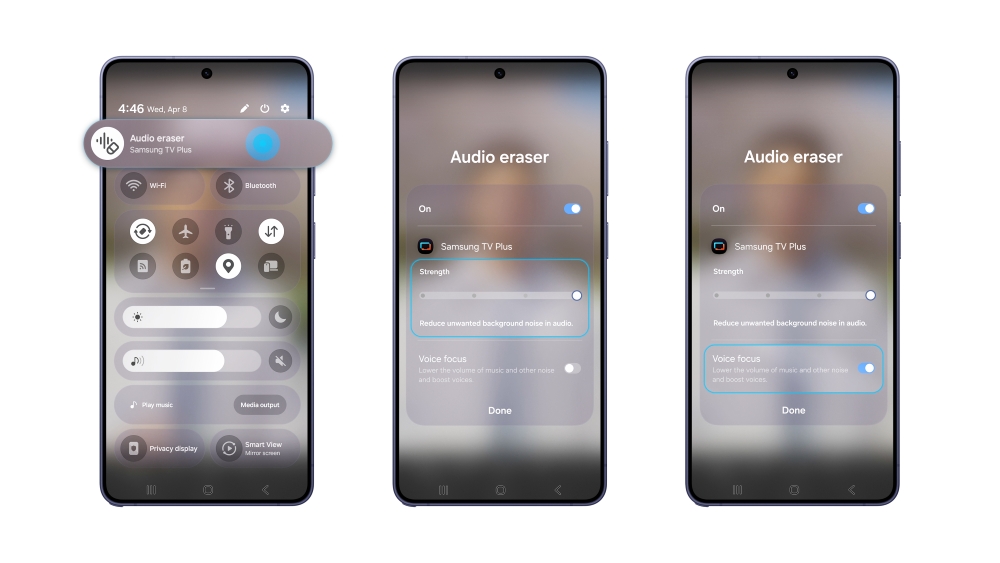
The Galaxy S26 series has introduced an enhanced version of its Audio Eraser feature, which now allows for real-time noise reduction and sound amplification in streaming content. Originally launched with the Galaxy S25 series for editing saved videos, Audio Eraser has since expanded its capabilities. It now supports playback adjustments within native apps like Gallery and Voice Recorder on Galaxy Z Fold7 and Z Flip7.
With the latest Galaxy S26 series, the feature has progressed to offer real-time audio control across various streaming platforms. This development marks a shift from post-recording edits to live audio management, enabling users to separate and optimize sounds such as voices, music, and background noise in real-time. The integration of an AI sound engine with advanced sound separation technology allows users to instantly adjust audio, ensuring a clear listening experience even in noisy environments.
Users can easily access Audio Eraser via the Quick panel, providing seamless control over sound without needing to pause or rewind content. By swiping down from the top right of the screen and tapping the Audio Eraser icon, users can start filtering sound immediately. The feature includes advanced controls, such as a “Strength” slider for noise reduction and a “Voice Focus” option for enhancing dialogue clarity.
This new functionality allows for a more personalized and immersive audio experience, regardless of the content being watched. The Galaxy S26 series supports noise adjustment for media through the Quick panel on select apps, with varying levels of support depending on the model and OS version. While the feature can detect different types of sound, including voices and music, the accuracy may vary based on the audio source and video conditions.